Vulkan Pipeline Cache
Leverage Vulkan pipeline cache to reduce pipeline initialization latency.
1. Introduction
Creating a Vulkan pipleine(render pipeline/compute pipeline) is expensive because it involves:
- Shader compilation.
- Pipeline state initialization, especially for rendering pipeline which includes vertex/fragment processing, tessellation, rasterization, etc.
- Hardware-specific tuning (register allocation, scheduling, etc.)
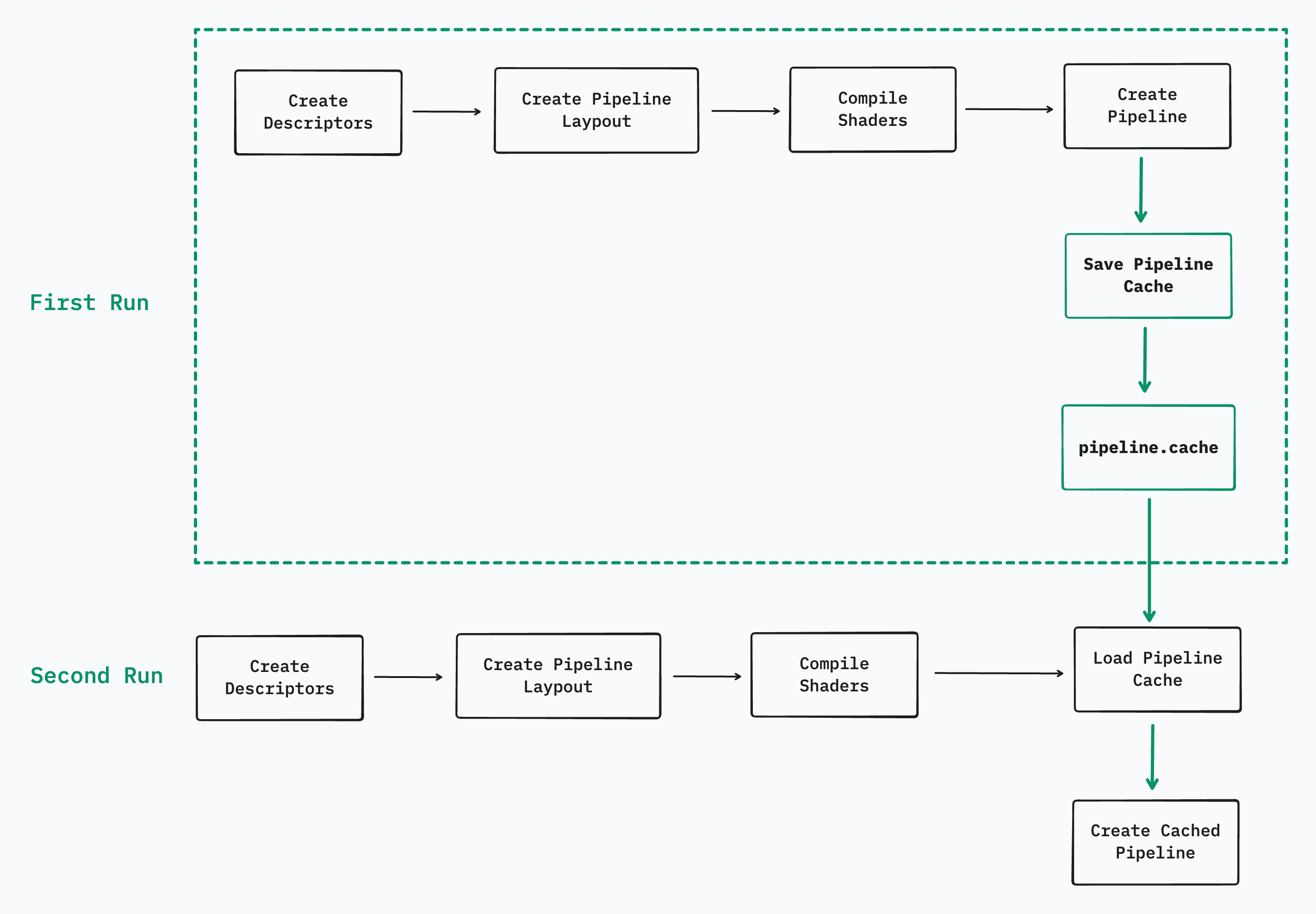
In a normal Vulkan compute pipeline creation, Create Pipeline takes the most of the initialization time.

What Vulkan pipeline cache does is to save the pipeline state to a file so that it can be reused between runs of an application.
2. APIs
To create a pipeline cahce object:
1 | VKAPI_ATTR VkResult VKAPI_CALL vkCreatePipelineCache( |
We need to populate the VkPipelineCacheCreateInfo to create a cached object:
1 | typedef struct VkPipelineCacheCreateInfo { |
vkCreateComputePipelines allows us to pass a VkPipelineCache object:
1 | VKAPI_ATTR VkResult VKAPI_CALL vkCreateComputePipelines( |
To read and save pipeline cache as binary data, we need vkGetPipelineCacheData:
1 | VKAPI_ATTR VkResult VKAPI_CALL vkGetPipelineCacheData( |
3. Implementation
Detailed implementation of pipeline cache can be found at: https://github.com/chuzcjoe/CORE/blob/master/vulkan/tests/ComputeGaussianBlurTest.cpp
From my local testing (Mac with M2), for a gaussian blur compute pipeline creation, the latency can be optimized from 10.2ms to 1.2ms. That’s 90% optimization.
4. Pipeline Cache may not working
There are several real-world scenarios where a Vulkan pipeline cache will not be effective, even if you correctly save and reload it. The key principle is: Pipeline cache is driver and environment dependent, and only works when the exact compilation context matches.
For example, in the following cases, pipeline cache will not help with the latency improvement:
- Different GPUs.
- GPU driver versions mismached.
- Different GPU vendors (Nvidia, Qualcomm, AMD, etc).
- Any changes in pipeline states(shaders, descriptors, render pass, rasterization state, etc).
- And more.
Vulkan enforces strict constraints for pipeline cache effectiveness. Even on the same device, a saved pipeline cache may become invalid due to changes in the device context. Vulkan validates this by checking the following properties:
1 | typedef struct VkPhysicalDeviceProperties { |
If Vulkan detects any mismatch between the current state and the cached metadata, the pipeline cache will not function as intended.
Vulkan Pipeline Cache
